How to Create Your First RAG Collection
To create your first RAG collection, prepare and clean your documents, split them into chunks, generate vector embeddings, store them in a vector database with metadata, connect a retriever to an LLM, and test semantic search before deploying — a repeatable pipeline that grounds AI responses in your own data.
Retrieval-Augmented Generation has moved from research paper to standard architecture for enterprise AI in the space of a couple of years — and at the center of nearly every RAG system is one foundational piece of infrastructure: the collection of indexed, searchable knowledge that the model retrieves from before it answers.
How you create your first RAG collection determines almost everything downstream — retrieval accuracy, response quality, latency, and cost all trace back to decisions made at the indexing stage. A poorly chunked, badly embedded collection produces a RAG system that hallucinates confidently even with retrieval turned on.
This tutorial walks through building a RAG collection from scratch: what it is, the full workflow behind it, prerequisites, a ten-step implementation guide, how to choose a vector database, the mistakes that quietly break retrieval quality, and the infrastructure needed to run it in production. By the end, you'll have a working mental model — and a working collection — ready to power a real RAG application.
Table of Contents
Understanding the RAG Workflow
Step-by-Step Guide to Creating Your First RAG Collection
Choosing the Right Vector Database
Common Mistakes When Building RAG Collections
How NevTan Cloud Simplifies RAG Deployment
What Is a RAG Collection?
A RAG collection is the indexed set of document chunks, their vector embeddings, and associated metadata that a Retrieval-Augmented Generation system searches over to find context for a given query. It's the searchable knowledge base sitting behind the LLM — not the model itself, but what the model is allowed to look up.
A collection typically bundles together: the original text chunks, a vector embedding for each chunk, metadata (source, date, category, permissions), and an index structure that makes similarity search fast even as the collection grows to millions of entries.
Collections matter because retrieval quality is capped by collection quality — no amount of prompt engineering or model capability compensates for a collection that's poorly chunked, inconsistently embedded, or missing the metadata needed to filter irrelevant results.
A simple analogy: think of a RAG collection as a well-organized reference library, where every book has been indexed by topic, cross-referenced, and shelved so a librarian (the retriever) can find the right page in seconds. A bad collection is a library where books are unsorted, undated, and half-labeled — the librarian can still search, but the results are unreliable.
It's worth noting a RAG collection isn't static once built. As source documents change, new content is added, and old policies are retired, the collection needs a re-indexing process to stay accurate — treating it as a living artifact rather than a one-time setup step is what keeps retrieval quality from silently drifting over time.
Understanding the RAG Workflow
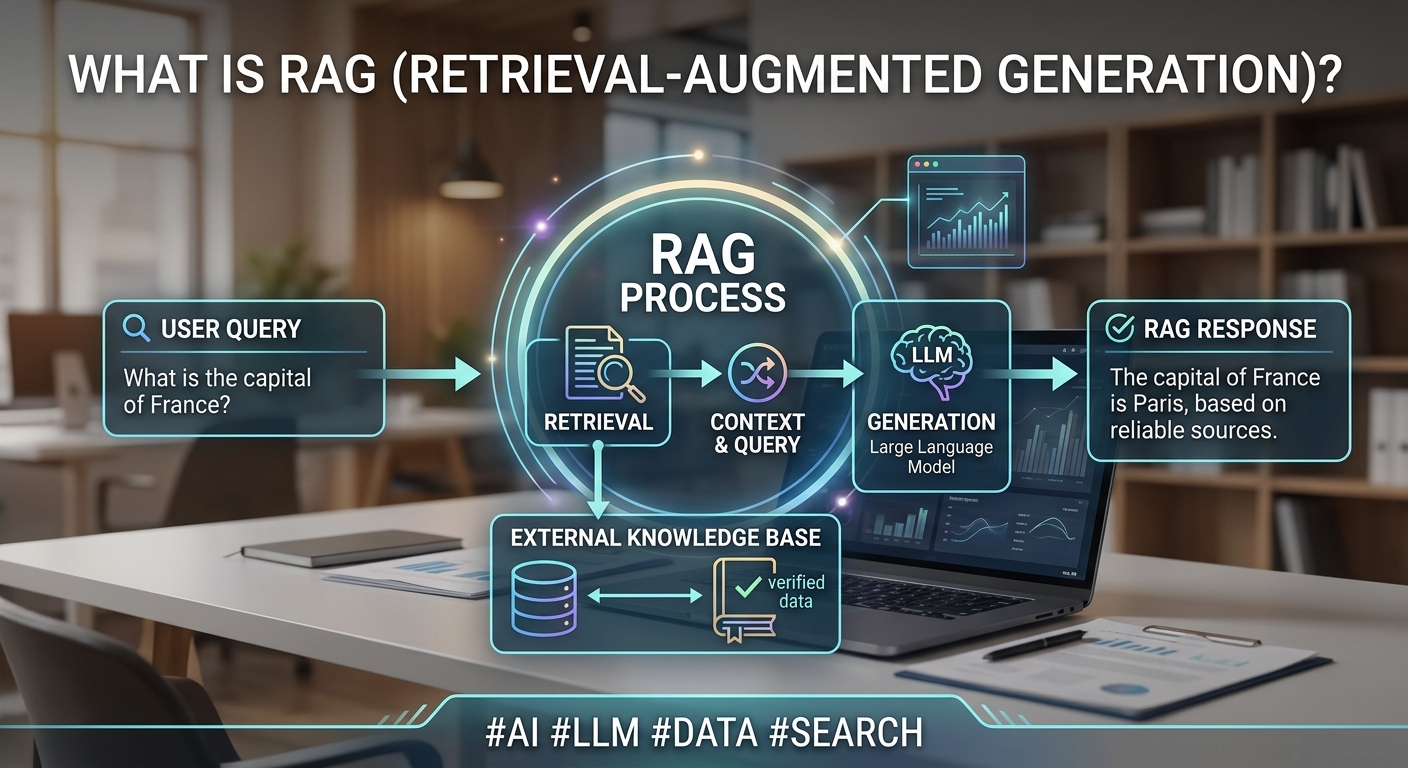
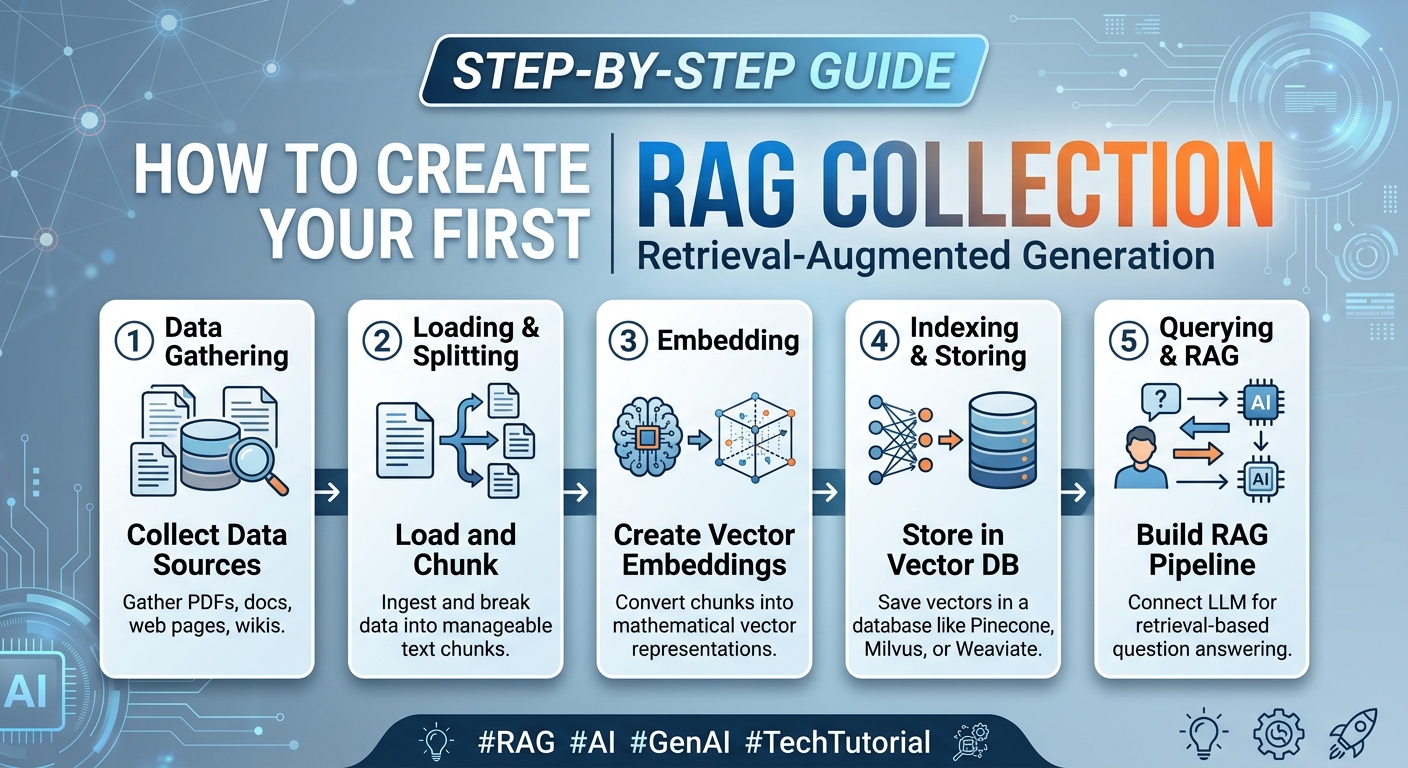
Before building a collection, it helps to see where it fits in the full pipeline:
User Query — A person asks a question in natural language.
Document Upload — Source documents (PDFs, wikis, tickets, product docs) are ingested into the pipeline.
Chunking — Documents are split into smaller, retrievable pieces sized for both context and precision.
Embedding Generation — Each chunk is converted into a vector embedding capturing its meaning.
Vector Database Storage — Embeddings and metadata are stored in a vector database, indexed for fast search.
Semantic Search — The user's query is embedded the same way and compared against the collection.
Context Retrieval — The most relevant chunks are retrieved and assembled into context.
LLM Response — The LLM generates its answer using the retrieved context alongside the original query.
Suggested diagram: a left-to-right architecture diagram — Documents → Chunking → Embedding Model → Vector Database (Collection) → Query → Semantic Search → Retrieved Context → LLM Response — with the collection itself highlighted as the persistent artifact everything else is built around.
Document upload through vector database storage is the one-time (or periodically repeated) indexing pipeline that builds the collection. Semantic search through LLM response is what happens on every single query. Getting the indexing half right is what this tutorial focuses on.
Prerequisites
Before starting, make sure you have:
GPU access — embedding generation and LLM inference both benefit from GPU acceleration, especially at any real document volume.
An LLM — access to a large language model, whether hosted or self-managed, for the generation half of the pipeline.
An embedding model — a model dedicated to converting text into vectors; this is a separate model from your LLM.
API access — credentials and endpoints for whichever embedding model, LLM, and vector database you choose.
A vector database — a place to store and search embeddings; see the comparison later in this guide.
A development environment — Python is the most common choice, typically alongside a framework like LangChain or LlamaIndex to orchestrate the pipeline.
Cloud infrastructure — somewhere to run embedding, storage, and inference reliably once you move past local prototyping.
None of these need to be enterprise-grade on day one — many teams start with a local vector database and a modest GPU instance, then move to managed infrastructure once the collection and query volume justify it.
Step-by-Step Guide to Creating Your First RAG Collection
Step 1: Prepare Your Documents
Gather the source material your RAG system should draw from — product docs, internal wikis, PDFs, support tickets. Keep formats consistent where possible; a mix of scanned PDFs, HTML, and plain text will each need different extraction handling.
Step 2: Clean and Normalize Data
Strip boilerplate (headers, footers, navigation text), fix encoding issues, and normalize whitespace. Clean input text produces measurably better embeddings than raw, noisy extraction output.
Step 3: Split Documents into Chunks
Break documents into chunks sized for retrieval — commonly 200–500 tokens, depending on content density. Example: a 20-page product manual might split into roughly 60–100 chunks along section or paragraph boundaries, rather than arbitrary fixed character counts, to preserve meaning.
Overlap between chunks (typically 10–20% of chunk length) helps avoid losing context that falls right at a chunk boundary — a sentence split awkwardly across two chunks can lose meaning in both.
Step 4: Generate Embeddings
Run each chunk through your embedding model to produce a vector representation. Batch this process for efficiency — embedding 10,000 chunks one at a time is dramatically slower than processing them in batches of 100 or more.
Step 5: Store Embeddings in a Vector Database
Write each chunk's embedding, original text, and an ID into your chosen vector database. This is the moment your "collection" actually comes into existence as a searchable index.
Choose an index type appropriate for your scale at this step too — most managed vector databases default to a sensible ANN (approximate nearest neighbor) index, but very large collections may need tuning for the right speed-versus-accuracy tradeoff.
Step 6: Configure Metadata
Attach metadata to each entry — source document, section, date, access permissions, category. Example: tagging chunks with a department field lets you later filter an HR query to only search HR documents, improving both relevance and security.
Step 7: Test Semantic Search
Before connecting an LLM, query the collection directly and inspect what comes back. If a query about "refund policy" doesn't surface your refund policy document in the top results, the problem is in chunking, embeddings, or metadata — not the model.
Step 8: Connect Your LLM
Wire the retriever's output into your LLM's prompt, typically via a framework like LangChain or LlamaIndex, so retrieved chunks are injected as context alongside the user's question.
Step 9: Optimize Responses
Tune the number of retrieved chunks, prompt structure, and any re-ranking step based on real query results. Small changes here — like reducing five loosely relevant chunks to three tightly relevant ones — often improve accuracy more than any model swap.
A lightweight re-ranking step, run after initial vector search, can meaningfully improve precision by re-scoring the top candidates against the query before they're passed to the LLM.
Step 10: Deploy Your RAG Collection
Move from local prototype to a hosted environment with GPU-backed inference, autoscaling, and monitoring, so the collection stays fast and available as usage grows.
Quick Tutorial Checklist
Source documents gathered and formats identified
Text cleaned and normalized
Chunk size chosen and tested against sample content
Embedding model selected and batch pipeline built
Vector database provisioned and connected
Metadata schema defined and applied
Semantic search tested directly, before adding the LLM
Retriever connected to the LLM prompt
Retrieval count and prompt structure tuned
Collection deployed with monitoring in place
Choosing the Right Vector Database
Database | Managed | Open Source | Scalability | Cost | Best Use Cases |
|---|---|---|---|---|---|
Pinecone | Yes | No | High | Usage-based, premium | Managed production RAG, low-ops teams |
Weaviate | Yes | Yes | High | Free self-host / paid managed | Hybrid search, GraphQL-based apps |
Milvus | Yes (Zilliz) | Yes | Very high | Free self-host / paid managed | Large-scale, high-throughput search |
ChromaDB | Limited | Yes | Moderate | Free (self-host) | Prototyping, small-to-mid RAG apps |
FAISS | No (library) | Yes | High (manual) | Free (compute only) | Research, custom similarity search |
Elasticsearch | Yes | Yes | High | Free self-host / paid managed | Hybrid keyword + vector search |
For a first RAG collection, ChromaDB or a managed option like Pinecone or Weaviate keeps setup simple. As collections grow past a few million vectors or need tighter production SLAs, Milvus, Weaviate, or Elasticsearch's vector capabilities tend to scale more predictably.
Enterprise readiness matters as much as raw scalability — factors like role-based access control, audit logging, and multi-tenancy support often decide which option fits a production deployment, separate from performance benchmarks alone.
Common Mistakes When Building RAG Collections
Mistake | Impact | Best Practice |
|---|---|---|
Poor chunk sizes | Chunks too large dilute relevance; too small lose context | Test chunk size against real queries, not a default |
Duplicate embeddings | Wasted storage and skewed retrieval toward repeated content | Deduplicate source documents before indexing |
Missing metadata | No way to filter results by source, date, or access level | Define a metadata schema before ingesting documents |
Wrong embedding model | Poor semantic matches for domain-specific or technical content | Match the embedding model to your content type and language |
Low-quality documents | Confidently wrong answers grounded in bad source material | Curate and review source documents before indexing |
Weak prompts | Retrieved context ignored or misused by the LLM | Explicitly instruct the model to answer from provided context |
Ignoring monitoring | Retrieval quality silently degrades as data and queries evolve | Track retrieval relevance and answer quality continuously |
Best Practices
Once a collection is live, a handful of ongoing practices separate a RAG system that stays accurate from one that quietly degrades over months of real usage.
Chunk optimization — test multiple chunk sizes against representative queries rather than assuming a single default works everywhere.
Metadata filtering — use metadata to narrow search scope before relying on similarity ranking alone.
Embedding quality — keep the embedding model consistent between indexing and querying — mixing models breaks similarity search.
Hybrid search — combine keyword and semantic search for queries with exact terms, like product codes or names.
Monitoring — log what's retrieved for each query, not just the final answer, so retrieval issues are visible.
Security — apply access control at the collection level so retrieval never surfaces content a user shouldn't see.
Performance optimization — batch embedding jobs and cache frequent queries to reduce GPU load.
Cost optimization — right-size vector database and GPU capacity to actual collection size and query volume, not peak guesses.
Infrastructure Requirements
A RAG collection that works in a notebook doesn't automatically work in production — it needs infrastructure built around three coordinated stages:
GPU inference — powers both embedding generation during indexing and LLM inference at query time.
Kubernetes — orchestrates indexing jobs and serving deployments as separate, independently scaled workloads.
Autoscaling — query traffic is unpredictable; fixed-size deployments either waste spend or fall over under load.
Storage — collections and their metadata need fast, durable storage that scales with document volume.
Networking — keeping embedding, vector database, and LLM on the same network avoids added latency and egress cost.
Monitoring — covering both infrastructure health and retrieval quality, since either can degrade independently.
High availability — replicated indexes and failover so a single node issue doesn't take down search entirely.
Enterprise security — encryption and access control on the collection itself, since it often holds an organization's most sensitive knowledge.
None of these run well in isolation — embedding load spikes during re-indexing while query load tracks live traffic, so infrastructure that scales each stage independently, rather than treating the whole pipeline as one fixed deployment, is what keeps a RAG collection fast and cost-efficient as it grows.
How NevTan Cloud Simplifies RAG Deployment
Moving a RAG collection from a local prototype to production means running embedding, vector search, and inference together reliably — which is exactly the workload the NevTan Cloud AI infrastructure platform is built around.
GPU cloud instances handle embedding generation and LLM inference on the same private network as your vector database, so retrieval doesn't cross networks or add a separate egress bill. Managed Kubernetes support lets indexing jobs and query serving scale independently as your collection and traffic grow. For teams building AI assistants or copilots on top of a RAG collection, the AI Agent Platform extends this with infrastructure purpose-built for multi-step, agentic workflows.
On the data side, Enterprise Security and the AI Data Policy cover encryption, access control, and data handling — worth reviewing directly, since a RAG collection is often the most sensitive knowledge an organization has in one searchable place. Reliability is documented in the Service Level Agreement, and the Trust Center explains how those commitments are audited.
For infrastructure planning, Pricing is published and transparent, which matters once a RAG deployment spans embedding, vector storage, and inference as separate GPU-dependent services. Why NevTan Cloud goes deeper into the reasoning for teams evaluating managed infrastructure, About NevTan Cloud covers the platform itself, and the AI Cloud Blog has more implementation guides for teams building on RAG.
Conclusion
Creating your first RAG collection comes down to a repeatable pipeline: prepare and clean your documents, chunk them thoughtfully, generate consistent embeddings, store them with useful metadata, and test retrieval directly before ever connecting an LLM. Most RAG quality problems trace back to this indexing stage, not the model generating the final answer.
The best practices that matter most are the simplest to skip under deadline pressure: testing chunk sizes against real queries, keeping embedding models consistent, and monitoring retrieval quality continuously rather than assuming it stays static as your collection grows. Avoiding the common mistakes covered here — mismatched embeddings, missing metadata, unmonitored drift — will save far more time than any downstream optimization.
As RAG becomes the default architecture for enterprise AI, future-proofing your collection means building it on infrastructure that can scale with it — GPU capacity, vector storage, and orchestration that grow with your document volume and query traffic rather than requiring a rebuild. When you're ready to move your first RAG collection into production, explore NevTan Cloud's pricing or learn more about why teams choose NevTan Cloud as the infrastructure behind their RAG applications.
FAQ
What is a RAG collection?
A RAG collection is the indexed set of document chunks, vector embeddings, and metadata that a Retrieval-Augmented Generation system searches over to find relevant context for a query.
How do I create a RAG pipeline?
Prepare and clean your documents, split them into chunks, generate embeddings, store them in a vector database with metadata, then connect a retriever to your LLM and test before deploying.
What database should I use for RAG?
It depends on scale and team preference — ChromaDB or a managed option like Pinecone are common starting points, while Milvus or Weaviate suit larger, production-scale collections.
What are embeddings?
Embeddings are numerical vector representations of text that capture meaning, allowing a system to compare how semantically similar two pieces of content are.
Why is chunking important?
Chunk size directly affects retrieval precision — chunks that are too large dilute relevance, while chunks that are too small lose the context needed for a useful answer.
How do vector databases work?
They store embeddings alongside an index optimized for similarity search, so a query embedding can be quickly compared against millions of stored vectors to find the closest matches.
What is semantic search?
Semantic search finds results based on meaning and context rather than exact keyword matches, powered by comparing vector embeddings.
Can I build RAG without fine-tuning?
Yes — RAG is specifically designed to ground a general-purpose LLM in your data without any model retraining, using retrieval instead.
Which embedding model should I use?
Match the model to your content type and language; general-purpose models work well for broad content, while domain-specific models perform better on technical or specialized text.
How do I deploy a RAG application?
Move from local prototyping to hosted GPU infrastructure with autoscaling and monitoring, keeping your embedding service, vector database, and LLM on the same network to minimize latency.
Key Takeaways
A RAG collection is the indexed chunks, embeddings, and metadata a RAG system retrieves from — separate from the LLM itself.
Retrieval quality is capped by collection quality, so chunking, embedding consistency, and metadata deserve as much attention as the model.
The core build process is: prepare documents, clean, chunk, embed, store, add metadata, test retrieval, connect the LLM, tune, deploy.
Test semantic search directly before adding the LLM — most RAG accuracy problems originate in retrieval, not generation.
Vector database choice should match your scale: simple managed options for a first collection, higher-throughput options as you grow.
Production RAG collections need GPU infrastructure, autoscaling, monitoring, and security designed around the whole pipeline, not just storage.